












Works on Mac (intel) and Windows
with Photoshop CC2014 to 2024 (*)
PNG EXPRESS is a Photoshop® plug-in that slices and exports your PSD document to individual PNG, JPG, & SVG assets, and generates matching design specifications with concise information on sizes, distances, font features etc.
It's easy and flexible with full control for designers, while providing clear and consistent deliverables for developers. That means faster workflow, better communication, and less mistakes along the way.
PNG Express makes it incredibly easy to export assets for all web, iOS, and Android densities in one go from any source resolution. You can even export multiple states and variations with automatic file naming and sizing.
The integrated export to Android 9-Patches and Xcode Assets Catalogs, metadata output, and PNG optimization makes asset integration a breeze.
PNG Express gets out of your way while you design, but gives you full control and repeatability of exports. This makes it an ideal tool for iterative workflows and team work.
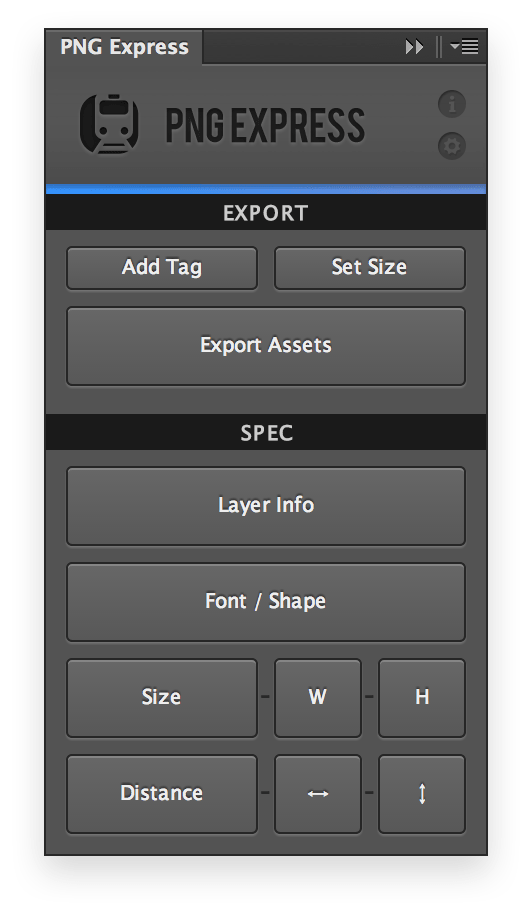
Creating specifications that clearly spells out the details in your design for developers can be a tedious task. With PNG Express you can create precise specs in just a few minutes!
You can spec any layer or group, but when specc'ing an asset PNG Express is able to reference the filename and use the size of the exported asset when measuring size, distance, and position. This greatly increases the accuracy of your specs.
Specc'ing high density designs is made simple by the option to scale all measurements to the correct scale used by developers. The generated specs are fully editable and easy to reposition.
PNG Express has streamlined our production hand-off allowing for quicker iterations, reduced tedium for our designers, and has put big smiles on our engineer's faces at each kick-off meeting.
PNG Express is *amazing*.
If you are exporting multi-res artwork out of Ps, GET. IT.
PNG Express is about to make your life easier.
PNG Express is an absolutely must-have extension for all mobile and web designers who quickly want to export perfectly sliced assets and measurements directly from Photoshop.
I use PNG Express all the time. It's awesome.
Bought it, cried with bloody tears over the countless hours spent slicing Photoshop files without it! It's BRILLIANT!
Makes exporting assets a breeze.
PNG Express is full of amazing features (..) It works beautifully, requires little effort, and makes the usual chore of exporting a large .psd a less daunting task.
Export your PSD to individual assets for all iOS, Retina, and Android resolutions with unrivalled flexibility and scaling accuracy.
Export layers and groups with best-in-class SVG generation. You'll get SVG files that look like your PSD with clean code on the inside.
Save optimized PNGs, export perfect Android 9-patches to all densities, and iterate quickly with direct export to Xcode Asset Catalogs.
Create concise specs in minutes instead of hours. Spec layer or selection sizes, positions, distances, fonts, shapes, and layerFXs.
Write asset metadata to JSON, XML and HTML, or any other format customized with the powerful template system.
PNG Express is being trusted daily for demanding work by amazing designers and teams around the world. Get on board!
 Plugin for Mac and WindowsFree updates and bug fixesEmail supportPlugin for Mac and WindowsFree updates and bug fixesPriority email support
*NOTE: PNG Express is not compatible with Photoshop running natively on Apple Silicon chips (M1 etc).
If you have a new Mac with Apple Silicon you will need to open Photoshop in Intel mode using Rosetta.
This video uses an older version of PNG Express

May contain traces of long nights and single malts.
© 2012-2024 Rune Lund-Hermansen
All rights reserved

